參考網站
http://plog.longwin.com.tw/my_note-unix/2007/08/10/debian_ubuntu_liu5_gcin_2007
Debian 安裝無蝦米輸入法
先切換至要登入x的使用者家目錄下
user@debian:~$ wget http://edt1023.sayya.org/misc/noseeing-6.tar.gz
user@debian:~$ mkdir tmp; cd tmp
user@debian:~$ cp ../noseeing-6.tar.gz .
user@debian:~$ tar zxvf noseeing-6.tar.gz
user@debian:~$ mv noseeing.gtab ~/.gcin #.gcin是目錄,沒有的話要自行建立
重新登入,點選gcin圖示設定內定輸入法為嘸蝦米輸入法即可

2008年9月9日 星期二

Debian install X-window
- 安裝x-window
debian:~# apt-get install xorg
重新安裝virtualbox客端額外功能,安裝完後再重開機,再執行xserver的設定debian:~# dpkg-reconfigure -phigh xserver-xorg
X server driver選擇vboxvideo,解析度選640x480,800x600,1024x768,如要細部設定,直接修改xorg.confdebian:~# vi /etc/X11/xorg.conf
- 安裝輸入法、中文字型
debian:~# apt-get install gcin
將vista正黑體(msjh.ttf)安裝至linux,取得msjh.ttf後放至/usr/share/fonts/truetype/microsoft下,再執行
debian:~# apt-get install im-switch
debian:~# apt-get install ttf-arphic-uming
debian:~# apt-get install ttf-arphic-ukaidebian:~# fc-cache -v
- 安裝KDE桌面管理
debian:~# apt-get install kde-core
debian:~# apt-get install kde-i18n-zhtw - 音效
debian:~# apt-get install alsa-base
debian:~# apt-get install alsa-utils
debian:~# alsaconf
debian:~# apt-get install kmix
user@debian:~$ im-switch -s gcin之後只要在一般使用者下執行startx即可進入x-window,強烈建議不要使用root登入
user@debian:~$ LANG=zh_TW.UTF-8
user@debian:~$ LANGUAGE=zh_TW:zh
user@debian:~$ startx
Debian 掛載範例
掛載FAT:
debian:~# mount -t vfat -o nls=cp950 /dev/hda5 /mnt/win98
掛載ISO:
mount -o loop /root/ data.iso /media/cdrom
/etc/fstab下的寫法
/root/data.iso /root/share iso9660 loop,user,noauto 0 0
掛載NTFS-3G
mount -t ntfs-3g -o locale zh_TW.UTF-8 /dev/hda3 /mnt/xp
debian:~# mount -t vfat -o nls=cp950 /dev/hda5 /mnt/win98
掛載ISO:
mount -o loop /root/ data.iso /media/cdrom
/etc/fstab下的寫法
/root/data.iso /root/share iso9660 loop,user,noauto 0 0
掛載NTFS-3G
mount -t ntfs-3g -o locale zh_TW.UTF-8 /dev/hda3 /mnt/xp
2008年9月8日 星期一
9/22~9/26教召
退伍快兩年了,第一次教召,時間是9/22~926...一般兵不是四天嗎?怎麼會是5天....
上了一些網站看一下,查到突然發現後備同心演習的資料...
http://thinktank.nat.gov.tw/ct.asp?xItem=19891&ctNode=78&mp=1
同心演習
本部依國軍「漢光24號」演習想定指導架構,於實兵操演階段,循國土防衛作戰之程序,策劃動員演習課目,採「全島、分區、同時」方式,循「聯合戰力保 存」、「聯合截擊」、「國土防衛」作戰階段,演練動員前運後備部隊、滲透運補、輜重開設以及反空(機)降作戰、山隘、城鎮與海岸守備等作戰演練課目,於4 月24日策頒演習訓令,預於97年9月22至26日結合「漢光24號」實兵操演階段實施,本次動員演習後備參演兵力概約2萬3,500人。
GOD!我的運氣還真是好啊...
不過我還在職訓局的網工班上課說,不知道能不能緩徵...
畢竟職訓局的課程一週沒上會落後非常的多8*5=40hr,而且事關就業輔導的課程!
年年有演習,時時能教召,但我的課程就不是這麼一回事了!
明天教召令寄到手上再去問問看吧!天啊...
上了一些網站看一下,查到突然發現後備同心演習的資料...
http://thinktank.nat.gov.tw/ct.asp?xItem=19891&ctNode=78&mp=1
同心演習
本部依國軍「漢光24號」演習想定指導架構,於實兵操演階段,循國土防衛作戰之程序,策劃動員演習課目,採「全島、分區、同時」方式,循「聯合戰力保 存」、「聯合截擊」、「國土防衛」作戰階段,演練動員前運後備部隊、滲透運補、輜重開設以及反空(機)降作戰、山隘、城鎮與海岸守備等作戰演練課目,於4 月24日策頒演習訓令,預於97年9月22至26日結合「漢光24號」實兵操演階段實施,本次動員演習後備參演兵力概約2萬3,500人。
GOD!我的運氣還真是好啊...
不過我還在職訓局的網工班上課說,不知道能不能緩徵...
畢竟職訓局的課程一週沒上會落後非常的多8*5=40hr,而且事關就業輔導的課程!
年年有演習,時時能教召,但我的課程就不是這麼一回事了!
明天教召令寄到手上再去問問看吧!天啊...
Debian 讀取、寫入 NTFS,並讓遠端支援中文
要能讓Debian讀取並能寫入NTFS必需安裝NTFS-3G,先下載Stable Source Release 1.2812版本並安裝
debian:~# wget http://www.ntfs-3g.org/ntfs-3g-1.2812.tgz掛載XP
debian:~# tar zxvf ntfs-3g-1.2812.tgz
debian:~# cd ntfs-3g-1.2812
debian:~/ntfs-3g-1.2812# ./configure
debian:~/ntfs-3g-1.2812# make
debian:~/ntfs-3g-1.2812# make install
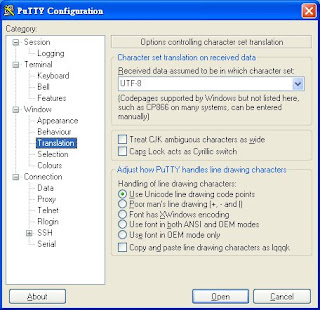
debian:~# mount -t ntfs-3g -o locale=zh_TW.UTF-8 /dev/hda3 /mnt/xp再利用putty對主機進行連結,唯一要額外改的設定為將Window->Translation下的語系設定改成UTF-8,即可在putty下遠端顯示NTFS的中文並修改

2008年9月6日 星期六
Debian 多重開機
hda1:Debian
hda2:swap
hda3:WinXP
hdb1:WinXP_2
hda2:swap
hda3:WinXP
hdb1:WinXP_2
- 使用boot.ini管理,需要建立與Debian連結的系統檔
- 在Debain下建立bootsect.lnx:
需先將bootsect.lnx備份至隨身碟,再進入WinXP後再將bootsect.lnx拷貝至c:\
debian:~# dd bs=512 count=1 if=/dev/hda2 of=bootsect.lnx - 在WinXP下建立bootseet.lnx:
下載dd for windows (http://www.chrysocome.net/dd) ,將dd.exe解壓至c:\下,開始->執行cmd進入命令提示字元,執行
c:\>dd count=1 bs=512 if=\\?\Device\Harddisk0\Partition0 of=bootsect.lnx
(hda1\\?\Device\Harddisk0\Partition0=hda1)會產生一個bootsect.lnx的檔案
編輯c:\boot.ini(需打開隱藏檔,或是我的電腦->滑鼠右鍵內容->進階->啟動及修復(設定)->編輯)
add
c:\bootsect.lnx="Debian GNU/Linux"
multi(0)disk(0)rdisk(1)partition(1)\WINDOWS="Microsoft Windows XP Professional_2" /noexecute=optin /fastdetect - 在Debain下建立bootsect.lnx:
- 使用GRUB管理
修改/boot/grub/menu.lst
add
title WinXP
root (hd0,2)
makeactive
chainloader +1
title WinXP_2
root (hd1,0)
map (hd1) (hd0) ##不加這兩行會出現
map (hd0) (hd1) ##Filesystem type unknown, partition type 0x7錯誤訊息
makeactive
chainloader +1 - XP MBR 救援
利用XP光碟開機,並按R進入復原主控台,選擇好要登入的Windows及輸入Administrator密碼後會進至C:\WINDOWS>,執行
C:\WINDOWS>fixmbr
你確定要寫入一個新的MBR嗎?y
C:\WINDOWS>exit
重開機即可 - GRUB MBR救援
debian:~# grub
grub> root (hd0,0)
grub> setup (hd0)
grub> quit
或是直接執行
debian:~# grub-install /dev/hda
也可使用救援光碟如Koppixx開機後,先將/dev/hda1掛載,再利用chroot切換至原系統,再將GRUB寫入MBR
root@0[root]# mount /dev/hda1 /mnt/hda1
root@0[root]# chroot /mnt/hda1
Knoppix:/# grub-install /dev/hda1
訂閱:
文章 (Atom)


 發表文章
發表文章

